iPad Energy Saving: How to Activate it in Automatic
Learn how to extend battery life by activating energy saving mode on iPad automatically with the Command app. Step by step guide.
Today mobile devices are essential for work and leisure, making battery autonomy an absolute priority for many users. Despite continuous hardware improvements, it often happens to need a few more hours of use from our Apple tablet, especially on the road or when we are away from an electrical outlet. Optimizing consumption becomes a fundamental operation.
To meet this requirement, Apple has introduced an extremely useful option: Energy Saving Mode on iPad. Already widely appreciated by iPhone users, this function is a quick and effective solution to extend battery life, intelligently limiting the most demanding system tasks and prolonging device usage.
What is Energy Saving Mode and How Does It Work on iPadOS #
Energy Saving mode is a native function designed to maximize residual autonomy of the iPad. Basically, the operating system suggests manual activation with a screen notification when the charging level drops to 20%, but the user can use this option at any time to prevent shutdown.
When activated, iPadOS adopts specific restrictions to drastically reduce energy requirements. Here are the main optimizations applied by the system:
- 5G connectivity limitation: Navigation could switch to standard networks (except during video streaming), reducing antenna consumption.
- Display optimisation: The automatic screen lock is forced to 30 seconds and the general brightness decreases. In addition, the refresh rate of ProMotion displays is blocked at 60 Hz to lighten the graphic load.
- Suspension of visual effects: The most complex interface animations are disabled for a smoother and less expensive experience for the processor.
- Interruption of synchronization: Background activities such as backup of photos on iCloud, automatic downloads and push reception of emails are temporarily blocked.
- Background update: Applications not in active use stop recharging data in the background, saving connection and cycles of CPU.
The combined action of these interventions guarantees valuable extra hours of autonomy, becoming crucial during long working days or study.
How to Activate Energy Saving in Automatic on iPad #
If you prefer not to manually activate the function whenever the battery is exhausted, you can automate the whole process in seconds. Using the Quick Commands app (Shortcuts), preinstalled on iPadOS, you can configure your tablet to limit your consumption in total autonomy when reaching a certain charge percentage.
Follow this step-by-step tutorial to create your own custom automation:
- Apri l’app Comandi: Trova e avvia l’applicazione ufficiale di Apple dedicata alla gestione delle automazioni.
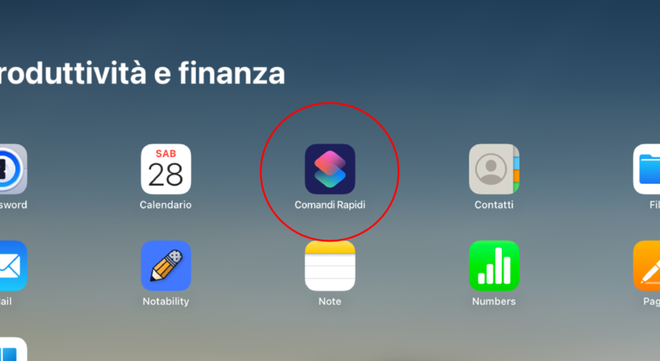
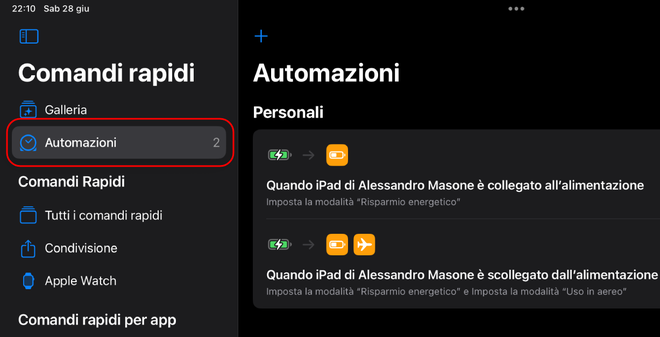
- Scegli la sezione Automazione: Nel menu di navigazione inferiore, fai tap sulla scheda “Automazione”.
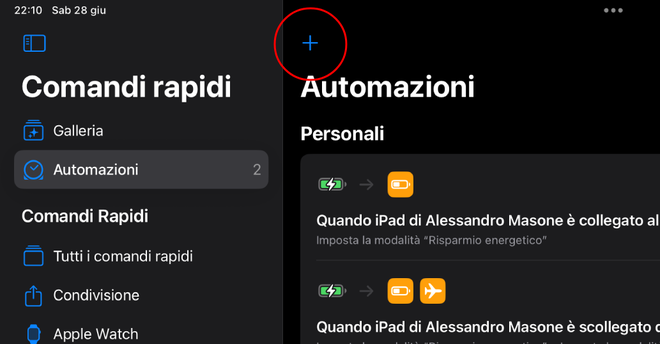
- Crea un nuovo comando: Fai tap sull’icona “+” in alto a destra e seleziona l’opzione “Crea un’automazione personale”.
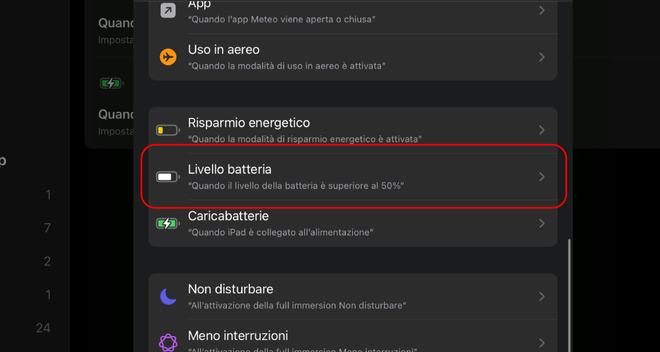
- Imposta la condizione scatenante: Scorri l’elenco delle variabili e seleziona “Livello batteria” come punto di partenza dell’automazione.
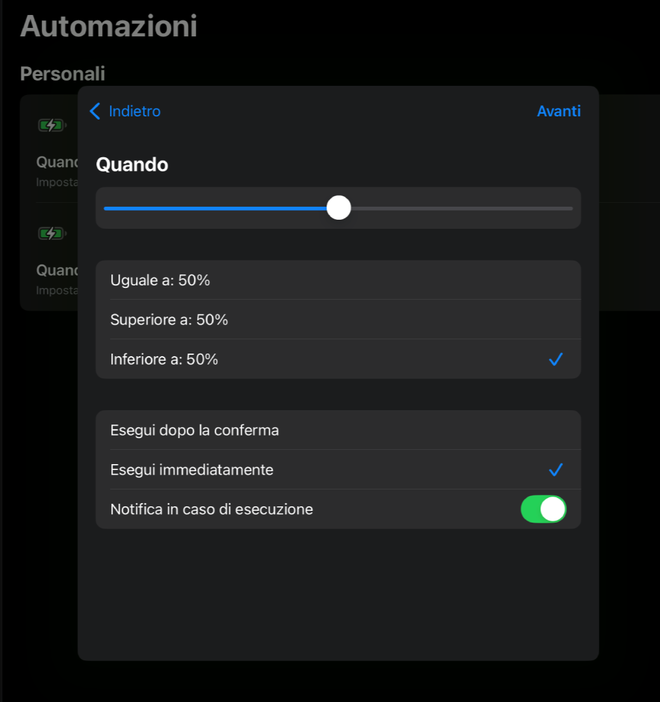
- Definisci la percentuale limite: Trascina lo slider per impostare la soglia della batteria (ad esempio il 30%). Assicurati che l’opzione “Inferiore a” sia spuntata. Quindi, spunta “Esegui immediatamente” per evitare che l’iPad richieda permessi manuali, e tocca “Avanti”.
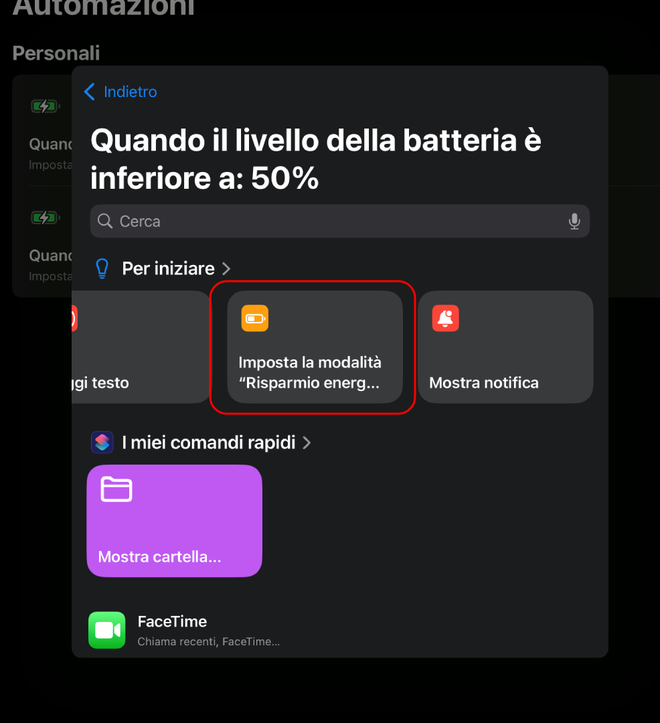
- Aggiungi l’azione di sistema: Nella barra di ricerca “Cerca app e azioni”, digita “Imposta la modalità Risparmio Energetico” e tocca il blocco corrispondente. Dopodiché, fai nuovamente tap su “Avanti”.
- Confirm and Save: View the overview of your new rule and, once you check the accuracy of the parameters, press “Fine” at the top right.


The game is done! Now your iPad will manage autonomy proactively. As soon as the charge drops below the set limit, the system will optimize energy consumption without need of your intervention, allowing you to continue using your apps in total serenity.
FAQ: Frequently Asked Questions about Energy Saving on iPad #
Energy saving mode wears the battery of the iPad over the long term? #
No, on the contrary. By limiting the processing power of the processor and lowering the brightness of the screen, the thermal stress of the internal components is significantly reduced. This shortness helps preserve the chemical health of lithium ions, protecting the longevity of the battery.
What Apple tablet models support this automation? #
All upgraded iPad at least to iPadOS 15 offer native Energy Saving mode integrated with the Command app. The list includes the models of the iPad Pro, iPad Air, iPad mini series and the basic versions of iPad sufficiently recent to support the software.
Can I turn off the auto command if I decide not to use it anymore? #
Of course. Disable the operation is immediate: just open the Command app, enter the Automation tab, tap on the rule you created earlier and turn off the switch of the item “Enable this automation”, or permanently delete the rule by scrolling with your finger to the left.