How to Use Smartphone as Webcam: Complete Guide
Learn how to use your Android or iPhone smartphone as a webcam for PC and Mac. Improve your video calls with the best apps on the market.
On this page
Knowing how to use a smartphone as a webcam can dramatically improve the quality of video calls on professional platforms such as Zoom or Microsoft Teams, while guaranteeing considerable economic savings. Although it is often advisable to buy a video conferencing video camera, there are many situations where the use of your mobile device is the most practical, quick and efficient alternative to avoid unnecessary expenses.
Fortunately, turning your mobile phone into a video device is an operation now within reach of everyone. Using specific applications, you can use a iPhone or a Android device as an extremely smooth webcam, regardless of whether it is operating on a macOS ecosystem or on a Windows PC.
The operating principle simply requires the installation of an app on the mobile device, which will transmit the audiovisual signal via the Wi-Fi network or via a more stable USB cable. This application will send data to a client software on the computer, which will communicate to video conferencing services that the target of the smartphone acts to all effects as a system webcam.
To maximise professional performance during virtual meetings, it is recommended to combine this solution with an adequate light ring for lighting and a quality external microphone to break down background noises. Below we analyze in detail the best apps to use your phone as a webcam, evaluating technical specifications, advantages and limitations.
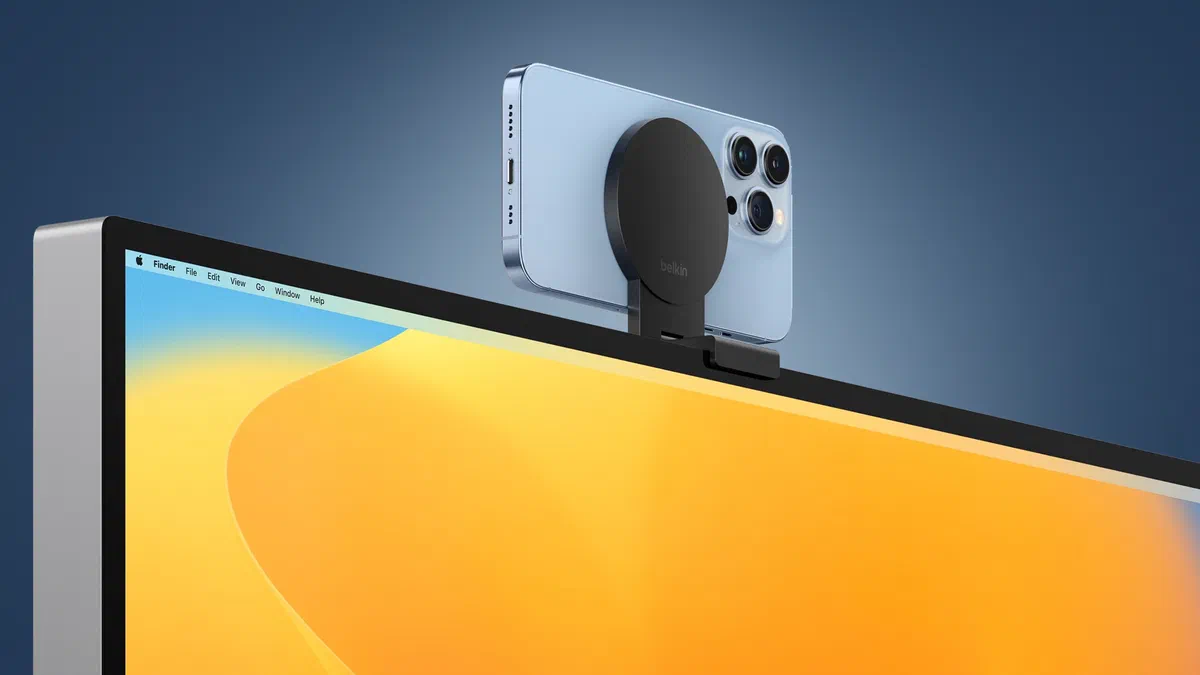
Moreover, for those who are immersed in the Apple ecosystem, it is necessary to mention the Continuity Camera feature. Officially introduced from macOS Ventura, this native option allows you to connect the iPhone to your Mac without using third-party software. Apple has even partnered with Belkin’s caliber brands to design practical magnetic media to be attached directly to the back of the laptop.
EpocCam #

After downloading and configuring the EpocCam app on your smartphone, the next step is to visit the official website of Eleven. to install certified drivers on your Mac or PC. Subsequently, it is essential that the phone and computer be attested on the same Wi-Fi network, although the USB cable connection remains the most performing option to reset latency. It is important to note that, at present, the application supports iOS (iPhone and iPad) devices but excludes the Android environment.
When installed, the mobile application interface will indicate the correct match by showing an active transmission icon. As soon as the client is launched on the notebook or desktop, the video feed captured by the phone lens will appear instantly on the computer screen, ready to be used.
The app allows you to move freely from the front to the rear camera. The free release puts a roof to the resolution (640x480 pixels) and includes advertisements on startup. By upgrading to the paid license, you unlock video streaming in Full HD (1080p), digital zoom via gesture, HDR format support and integrated torch activation to act as a fill light.

iVCam #

The iVCam platform stands out for extreme versatility: it manages video streams both wirelessly and via USB, and the mobile client is compatible with Android and iPhone devices. It is essential to point out, however, that the receiving computer application operates exclusively on the Microsoft Windows ecosystem. On the performance side, this tool supports high-definition output (up to 4K) and integrates seamless manual photo controls to balance exposure, ISOs and frame fluidity per second.
The native integration allows you to switch without delay between the various targets of the smartphone, supporting both the horizontal (landscape) and the vertical (portrait), enabling even the substitution of the background. iVCam can be tested through a free trial version, expandable then to the Premium package through a subscription plan or a permanent single license.

NDI HX Room #

The NDI (Network Device Interface) ecosystem is a broadcasting standard. To use the power, the user must install the appropriate application on the phone and match it to the driver package on the laptop. The entire process is based on local network connectivity: the app transmits high-bit signal via Wi-Fi to the computer, where the free NDI Virtual Input tool routes the feed to any virtual communication platform.
From the touch interface of the mobile software, the user can manage the optical zoom in real time, the clearing of the shadow zones and the forced activation of the flash module to help in poor light. It should be pointed out, however, that this app is placed in a premium band and is aimed at those seeking uncompromising performance, being proposed on digital stores at a cost of about 20 dollars.

Continuity Camera (Photocamera Continuity) #

If you simultaneously own a Mac and a iPhone, the main way to use your smartphone as a webcam is the Continuity Camera. Integrated at the operating system level, this feature establishes a secure and immediate connection, eliminating the need to download third-party clients and protecting your privacy at the highest levels guaranteed by Apple.
Using a iPhone 11 or later models, you have access to the Automatic Gear (Center Stage): this algorithm based on artificial intelligence performs live dynamic crops and panoramic zoom so that the rapporteur’s face never escapes from the visual frame. Even more surprising is the Desk View mode, which draws from the ultragrandangular lens to take back in a zenithical perspective all that is laid on the desk, an impagable function to show paper documents or prototypes.
To complete the experience, partner companies have launched MagSafe certified adapters on the market that allow to secure the iPhone firmly at the top edge of the MacBook screen, also acting as a support ring for the daily socket.

DroidCam #

On the competition side stands DroidCam, distributed with freemium formula. If the basic quality is not enough, the user can switch to DroidCamX Pro (with a modest outburst of about 5 dollars) to completely eliminate advertising, unlock the acquisition in HD at 720p and get direct manipulation powers on the image, including mirroring, white balance correction and activation of the LED flash for night use.
The infrastructure, curated by Dev47apps programmers, provides a downloadable application on Android and iPhone, although the desktop counterpart is written specifically to dialogue with Windows systems and Linux kernel-based machines, cutting out Mac users.
The data bridge supports both the Wi-Fi protocol and the USB cabling. The latter is strongly suggested to zero the frame rate drops and prevent sudden discharge of the battery. A crucial detail for Android owners is the ability to turn the app into a locked screen background, turning the phone into a hidden video surveillance IP cam.

NeuralCam Live #

The NeuralCam Live application is noted for its immediacy, while placing rigid hardware stakes: it works exclusively by combining a iPhone (or iPad) to a Mac computer. Differing from many competing apps, NeuralCam rejects wireless streaming and obliges encrypted passage through USB cable. This design choice inhibits connection delays, although it should be remembered that the software is not currently compatible with Safari, requiring the use of browsers such as Google Chrome or Mozilla Firefox for webcalls.
The real ace in the sleeve resides in filters fed by artificial intelligence. The “Head Bubble” feature cut out in real time a circular aura around the user’s head obscuring all the surrounding disorder. At the same time, the “Gesture Guard” module intercepts specific movements of the arms or inappropriate gestures by censoring them dynamically to preserve the decoration at the meeting.
The basic version has no access costs, but the upgrade to the NeuralCam Live Plus plane introduces remarkable photo packages: optimized filters for precarious ambient lighting, color profiles to soften the incarnate in video and the total removal of any promotional watermarks.

Reincubate Camo #

The virtual direction of Reincubate Camo Studio is one of the most advanced solutions on the market. From the control panel installed on the computer, the user can remotely fly their smartphone: choose which camera lock lens use, trigger fluid zoom, apply automatic tracking and minuziosically correct color aberrations. To unlock the highest resolution recording and real-time post-production functions, however, you need to support a license fee, available both in subscription and in one-time solution.
The free entry tier remains in any case a terrific tool: it ensures a sharp image and allows you to navigate smoothly between front and back camera. It also provides access to a series of colour presets (LUT) in black and white and base filters that can immediately ennoble the aesthetics of the room.
If Camo originally relied solely on the Mac-iPhone pairing, the excellent work of the development team opened its doors to Windows ecosystems and Android phones. As a guarantee of lag-free performance and professional standards, the software requires that the link between the two hardware only occurs through the robustness of a USB wired connection.

Frequently asked questions (FAQ) #
How does the use of the smartphone consume a lot of battery? #
Yes, keeping the photo sensor constantly running and processing a prolonged video stream involves intense energy consumption. To avoid abnormal overheating or sudden shutdowns during a meeting, it is highly recommended to communicate the mobile device with the PC by means of a USB cable: this configuration lowers the connection delays and guarantees the real-time charging of the phone.
Can I use the phone microphone instead of the PC? #
Absolutely. Almost all applications mentioned in this guide, such as DroidCam and iVCam, simultaneously encapsulate video and audio capture from the mobile phone. Simply access the remote settings of the video call software (such as Microsoft Teams or Skype) and select the virtual audio driver generated by the app.
How can I correctly place the phone on the monitor? #
In order to maintain a professional visual contact and avoid bass frames, the ideal approach involves the purchase of a small dedicated support. There are on sale desk stand with flexible arm, foldable mini-trippied, or the practical “clip mount” (magSafe clamp or magnetic supports) that allow you to firmly anchor the smartphone’s shell to the top frame of your computer monitor.