How to Install Mod on Minecraft: Guide to Forge
Find out how to install mod on Minecraft via Forge. Complete guide and step-by-step to download, configure and add changes in total security.
The official launcher (Vanilla) of Minecraft Java Edition does not natively support the execution of changes to the game. To enrich your videoludic experience, you need to install Minecraft Forge, a fundamental interface (API) to start mods safely and directly from your client.
Installation of Minecraft Forge: Pass-Pass Guide #
- Visit the official website and access the Minecraft Forge download page.
- Use the left side menu to select the exact version of Minecraft in your possession.
- Clicca sul pulsante “Installer” corrispondente alla release consigliata (Recommended) per garantire la massima stabilità.
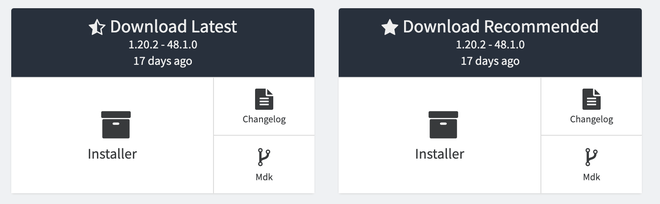
- Save your computer the newly downloaded
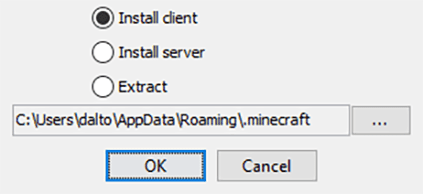
.jarfile extension and run it by double clicking. We remind you that you need to have Java installed on the system. - Nella schermata di installazione, verifica che l’opzione “Install client” sia selezionata e premi “Ok” per avviare il processo.
- At the end of the installation, open the Minecraft launcher and verify that the “Forge” profile has been correctly added to the drop-down menu of the lower left versions.


Note: If Forge’s profile doesn’t appear automatically, go to the “Installations” tab located at the top of the launcher and make sure you have checked the “Edit” box (or “Modded”) to view the custom clients.
How to Add Mods to Minecraft #
- Launch the official Minecraft launcher and select the Install tab from the top menu.
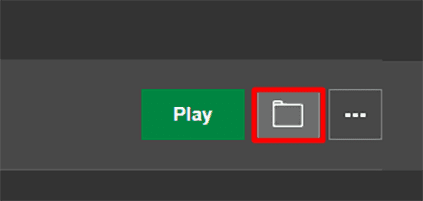
- Posiziona il cursore del mouse sopra il profilo di Forge e clicca sull’icona a forma di cartella posta sulla destra per aprire la directory del gioco.
- Inside the system directory, locate the folder called “mods”. If it is not present, create it manually ensuring that you write it entirely to tiny letters.
- Drag or paste the
.jarfile of the mod (or mod) previously downloaded within this folder.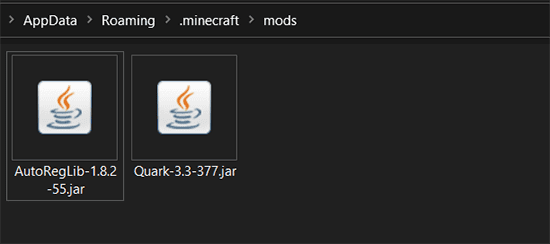
- Close the folder, return to the main launcher, select the Forge profile and click on Play to start the game with your new active expansions.


Where to Download Mods for Minecraft in Security #
CurseForge is unanimously recognized as the main and safest platform for downloading mod for Minecraft. Its vast database houses thousands of creations developed by the community, offering players endless possibilities to customize the gameplay. This portal guarantees a reliable and verified ecosystem, protecting users from malicious software and ensuring that all uploaded resources comply with strict safety standards.
Frequently asked questions (FAQ) #
Can I install the mods on the Bedrock version of Minecraft? #
No, Minecraft Forge and traditional .jar mods are compatible exclusively with Minecraft Java Edition on desktop operating systems. For the Bedrock version (available on consoles, mobile devices and Windows 10/11), you need to use the Add-On downloadable from the official Marketplace integrated into the game.
What to do if Minecraft crashes after entering a mod? #
Sudden crashes are almost always caused by incompatibility problems. Carefully check that the version of the downloaded mod matches the exact version of Minecraft and Forge you are using. Please note that some complex mods require additional libraries (often called Core Mods) to work: read the information provided by the developer on the official download page.
Installing mod on Minecraft is safe for my computer? #
Yes, provided you use established and authoritative portals such as CurseForge or Modrinth. Downloading content from these websites, the risk of encountering malware is almost null. The basic rule is to always avoid downloading files from deceptive websites, non-certified archives or via links shared by anonymous sources.