YouTube Music Desktop App: Download and Guide to PC and Mac
Discover the best YouTube Music Desktop App unofficial for Windows, macOS and Linux. Guide to features, plugins and free download of the client for PC.
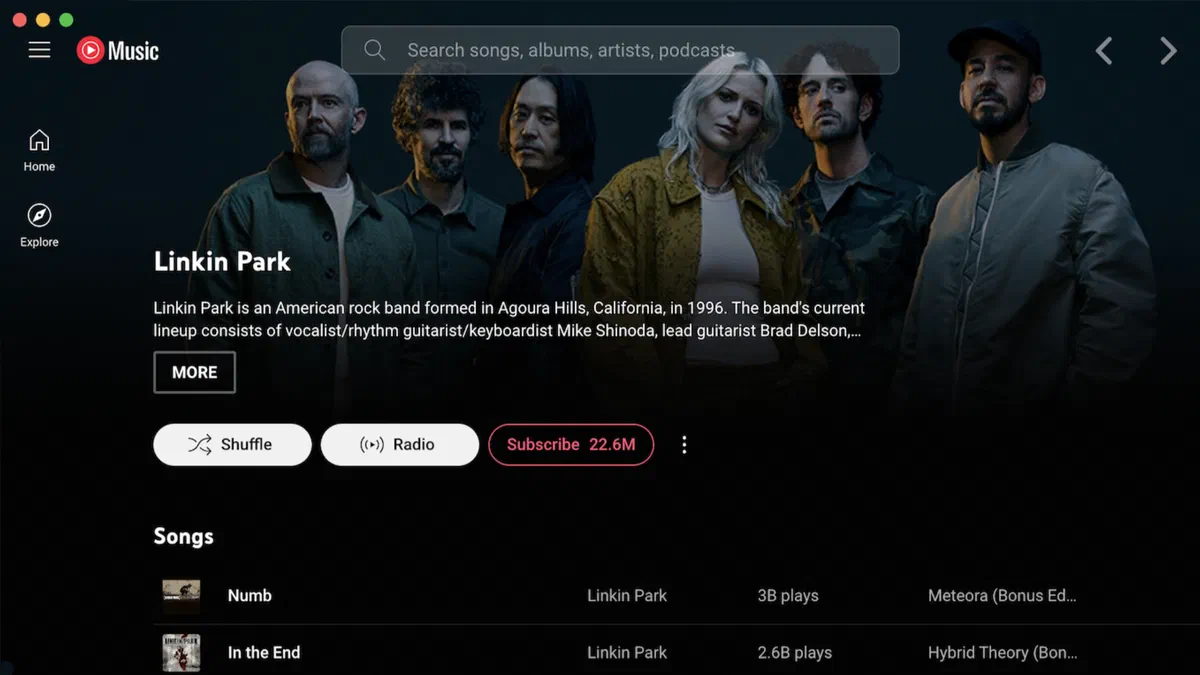
In the panorama of music streaming platforms, YouTube Music is asserting itself as one of the favorite choices of listeners, thanks to its immense catalog that combines official albums, remixes, live performances and exclusive content generated by users. Despite this success, many feel the lack of a real dedicated desktop application, able to guarantee a smooth, light and independent listening from the heavy web browser tabs.
To meet this strong community need, the YouTube Music Desktop App project, an open-source software client designed to fill the gaps of the official web service, offering a fast, elegant and rich user experience for PCs.
What is YouTube Music Desktop App? #
This is an unofficial client application, actively developed by the community and based on the Electron framework. This software allows you to use YouTube Music exactly as if it were a native app for Windows, macOS or Linux. The graphical interface faithfully reproduces that of the Google web service, but it integrates a series of exclusive features designed specifically for those who listen to music from the computer.
The entire project is hosted on GitHub and distributed completely free of charge. The open-source nature of the source code guarantees maximum transparency, security and privacy for all users.

Main Features and Benefits #
Total integration with the operating system #
Unlike the web version, the app natively supports keyboard media keys, shows system notifications for track change, offers a convenient tray icon in the application bar for quick controls and even includes integration with Discord Rich Presence, perfect for gamers or for those who love to share their listening. The goal is to make you forget that you are using a third-party client.
Advanced customization via plugin #
The real strength of this software is the ecosystem of integrated themes and plugins. With few clicks, users can overwhelm the graphical interface, add very useful extensions such as ad blocker, dynamic display of song lyrics and dedicated audio equalizer to optimize sound output according to their tastes.
Listening experience without distractions #
Open the new browser tab to listen to music consumes valuable resources (RAM and CPU) and generates distractions. This desktop client optimizes background performance and eliminates disturbing elements. It is the ideal choice for those who work or study on the computer and want an orderly and efficient location.
Active development and constant updates #
Supported by a solid community of independent developers, the project receives frequent updates that not only promptly correct bugs, but always introduce new features. If you have an idea to improve the app, you can easily report bugs or propose features via the official page on GitHub.
How to Download and Install the App #
The download and installation procedure is immediate and within reach of all:
- Visita la repository ufficiale del progetto: https://github.com/ytmd-devs/ytmd
- Download the installation file compatible with your operating system from the “Releases” section
- Run the downloaded file and follow the short setup wizard
- Launch the software and log in with your Google account to immediately find custom library, favorites and playlists.

Being a multiplatform software, it is available in download for Windows, macOS systems and Linux distributions, ensuring universal compatibility and “plug-and-play” configurations without having advanced computer skills.
Frequently Asked Questions (FAQ) on YouTube Music Desktop App #
Is the unofficial desktop application legal and secure? #
Yes, the software acts essentially as an isolated browser (based on Electron) that “packed” the official website of YouTube Music to make it a desktop program itself. Moreover, being the open-source and public code, it is constantly analyzed and verified by the world community of developers, ensuring high standards of security and privacy.
Can you listen to music offline by downloading songs? #
As the interface is based directly on the web infrastructure, the offline listening download functionality (typical of mobile apps for smartphones and tablets) is not natively supported in the desktop client. It requires an active internet connection to play the music library.
Do I have to own a Premium subscription to use the app? #
No, the app is completely free and also works with basic Google accounts, offering classical streaming listening. However, some internal plugins, such as the block of advertising, help to improve the user experience of the free version, although to legally support artists, a subscription to YouTube Music Premium is always recommended.