How to Make a Photo in Action Figure with AI
Learn how to turn a photo into personalized action figure using the artificial intelligence of ChatGPT. Step-by-step guide and example prompt included.
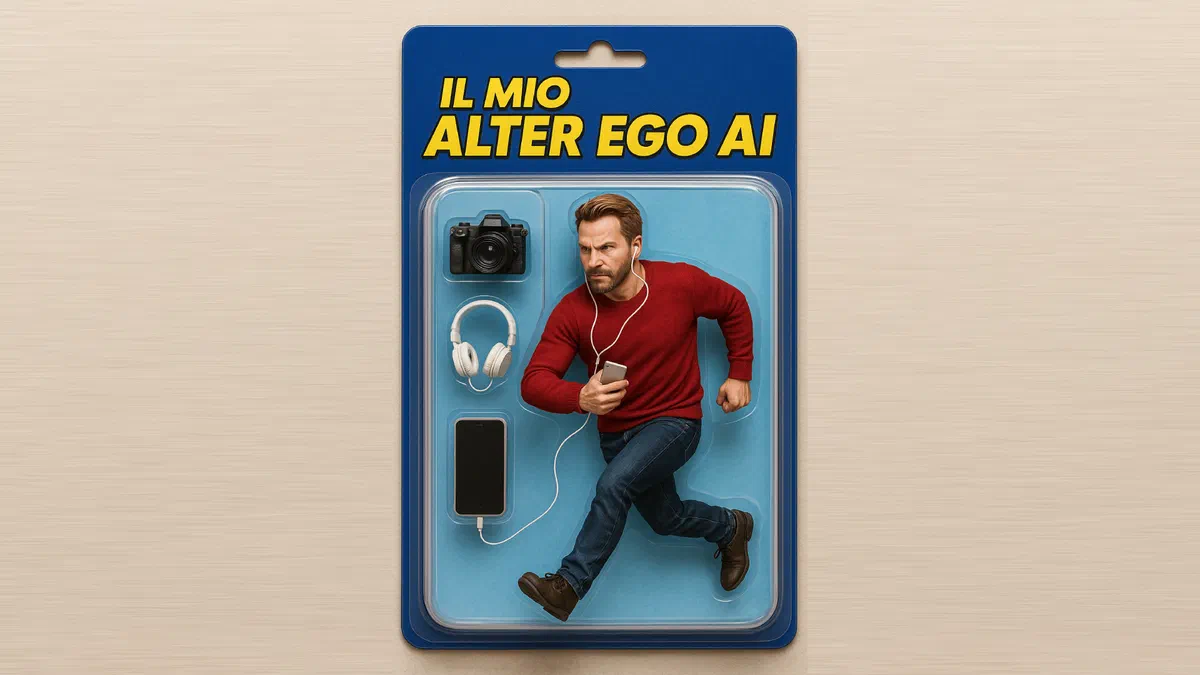
Artificial intelligence continues to revolutionize the world of digital creativity. After the great success of images in Ghibli style or the famous Funko Pop generated by AI, today we explore a new, incredible trend: turning a photo into action figures from highly realistic collection.
Thanks to the advanced image generation features integrated in ChatGPT, you can create your custom action figure in just a few simple clicks. The process is quick, within reach of all and, using the basic versions of the software, completely free.
What do you need to create a personalized action figure with AI? #
To start this fascinating digital transformation and generate your virtual toy, you will need only two key elements:
- A photo of departure: select a sharp and well-lit image of the subject you want to transform. An entire picture frame usually guarantees the best results, although it is possible to experiment successfully even starting from simple portraits or media abuses.
- A ChatGPT account: You can use the official mobile app or access directly through the web browser at chatgpt. Community.
How to turn a photo into action figures: the step-by-step guide #
The technical process to generate your character is extremely intuitive. Here are the exact steps to follow to get a perfect result:
- Login to ChatGPT: Launch the application on your mobile device or link to the official website from your computer.
- Upload the basic image: Click the attachment icon (usually in the form of a “+” sign) and select the photo that will act as a model for your action figure.
- Enter the optimized prompt: at this crucial stage you will need to provide artificial intelligence with detailed instructions. The more your description will be accurate, the better the final outcome. Below we will provide you with a template tested to copy and paste.
- Launch the Generation: Send the message containing the photo and text prompt, so wait a few seconds for ChatGPT to process and return your new collection action figure.
Examples of action figures generated with Artificial Intelligence #


The perfect prompt to create action figures with ChatGPT #
The quality and photorealism of your action figures depend almost entirely on the textual instructions you will type. Do not be afraid to experiment by adding specific details and characteristic features.
Below you will find a SEO-optimized and tested prompt that you can use right away. The parts written in capital and bold represent the variables we recommend to customize to make your character absolutely unique:
“From the photo uploaded in the annex, it creates a photorealistic image of an action figure of high quality collection. The character must be depicted in a DINAMICA pose and sealed inside its original transparent protective blister. The blister pack must present a BLU INTENSO header, on which the text IL MIO ALTER EGO stands out Written with characters GIALLO BRILLANTE. Place some specific and consistent accessories, such as a FOTOCAMERA, a pair of CUFFIES and a SMARTPHONE, placing them in separate compartments on the SINISTRO side of the box. The visible background inside the blister must be colored AZZURRO CIELO. It is essential that the toy faithfully replicates facial features, hairstyle and general appearance of the person portrayed in the original photo, maintaining a DETERMINATE expression. The final image must boast ultra-definite details, studio lighting and a visual output equal to a true commercial photograph. "
What details customize in your AI prompt #
- Pose of the character: do you prefer that your action figure is standing, caught in the full of the action, or in static exposure pose?
- Color Palette: Define the exact colors for the header of the box, for promotional writings and for the background of the blister.
- Text and writing: decide what to print on the packaging. You can insert your name, a nickname or an iconic phrase to your choice.
- Accessories included: Select items that represent your hobby or profession (e.g. work tools, musical instruments, tech gadgets). Always specify which side of the blister should be placed.
- Facial expression: indicates to AI if the face must appear happy, serious, threatening or smiling.
- Aesthetic style: choose whether to give the model a vintage 80s toy look, a modern and hyper-detailed design, or a stylized aesthetic.
Generation limits for users with free accounts #
If you are exploiting the free version of ChatGPT to turn a photo into action figure, it is important to remember that the system imposes a limit to the daily generation of images through DALL-E. Currently, restrictions limit creation to few images per day for non-payment accounts. Users with a premium subscription (ChatGPT Plus), however, enjoy significantly higher limits that allow you to experiment with numerous different prompts in total freedom.
Start experimenting and enjoy creating your own personal collection of virtual action figures!
FAQ: Frequently asked questions about creating action figures with AI #
What artificial intelligence to use to transform photos into action figures? #
The simplest, accessible and performing tool currently available is ChatGPT, which integrates the powerful DALL-E 3 image generator. Simply upload your photo to the chat and provide a detailed description of the desired toy.
Can 3D print the action figure generated by AI? #
The generators like ChatGPT only produce image files (two-dimensional 2D graphics). To transform this image into a 3D printable real object, you need to convert the photo into a three-dimensional model using digital sculpture software (such as ZBrush or Blender) or artificial intelligence tools specific to 3D modeling.
Are there any privacy issues uploading your photos to ChatGPT? #
OpenAI applies strict policies for managing and protecting personal data. However, if you want maximum privacy and avoid your selfies being used to train future AI models, you can disable data sharing for training directly from your account privacy settings.