How to Create a Custom Funko Pop from Your Photo
Learn how to use AI to generate custom collectible figures: prompt structures, chibi proportions, and the best tools for your design.
On this page
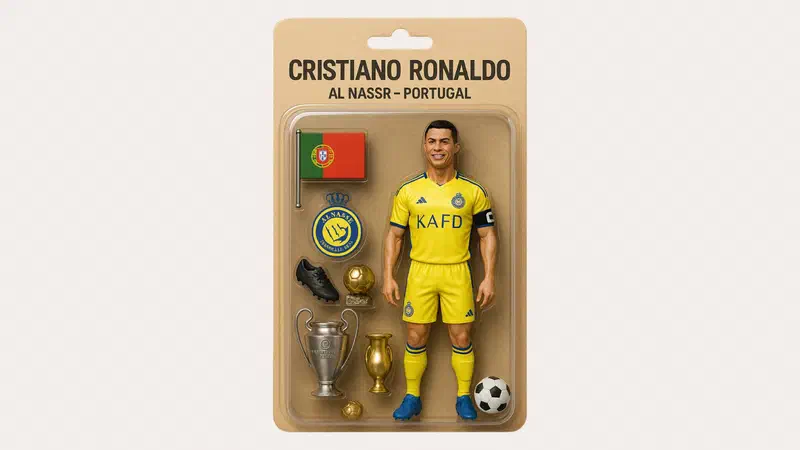
This trend emerged during the same season as the craze for blister pack action figures, and it works with any generator that accepts a photo.
What you need and how to do it #
All you need is a photo and an image generator that accepts them: ChatGPT and Gemini are the most popular, and they even work with free accounts, though there is a daily limit on images.
- Open a new chat and attach the photo using the + button or the paperclip icon.
- Paste the prompt you’ve constructed as I explain below: proportions, clothing, accessories, and the box.
- Send it, look at the result, and ask for corrections one by one.
For quick testing, even a simple prompt like “transform me into a stylized collectible figurine inside an orange box with the name MARIO” already gives you an idea. The rest of this article is about going from a mediocre result to one that actually looks like you.
The brand: where is the line #
Let’s start here, because it’s the question almost nobody asks and the one that matters most.
For personal use, there are no practical problems: an image used as an avatar, sent in a chat, or printed for yourself doesn’t interest anyone.
For commercial or public use, things change. The name is a registered trademark and the typical look of those figurines is a distinctive product feature: using it to sell something, to promote a business, or to produce items for sale is a different story altogether.
There’s also a practical effect: generators are increasingly refusing prompts that mention a brand. Describing the style instead of naming it is more accurate, and nowadays, it’s also what works best.
Describing proportions #
This is where you decide if the result will look like a figurine or just a tiny portrait. The style you are looking for belongs to the chibi family—a stylization with a head disproportionately large compared to the body, which has been popular in illustration long before collectible figurines existed.

Elements to include in your prompt:
- The head-to-body ratio. “Very large head compared to the body, stylized figurine proportions” matters more than any other detail.
- Simplified features. A figurine’s face is not a portrait: big and simplified eyes, essential facial features, no wrinkles or skin details.
- The material. “Glossy vinyl figurine,” “smooth surface, matte plastic”: this changes the entire look because it pushes the model toward an object rather than a drawing.
- The pose. Standing, facing forward, arms at sides: this is the typical pose for these figurines, and asking for it helps you avoid strange poses.
- The scene. Neutral background, studio lighting, a soft shadow on the floor: this makes the figurine look photographed rather than drawn.
Describing clothing #
The most common mistake is writing “wearing their clothes.” The model doesn’t know which ones, so it invents them.
Well-described clothing has three levels:
- The garments, one by one, with the color: “white shirt with rolled-up sleeves, dark blue pants, white sneakers.”
- Accessories that tell a story: these make the figurine recognizable more than facial similarity does. Glasses, a necklace, a cap, a tattoo on the forearm.
- The object in hand: a guitar, a laptop, a spatula, a soccer ball. In these figurines, the object is what defines the character, and it’s also what turns out best in generated images.
Prompt structure #
A template to fill in with your details:
Trasforma la persona nella foto allegata in una statuetta da collezione
stilizzata: testa molto grande rispetto al corpo, lineamenti semplificati,
aspetto in vinile lucido.
Abbigliamento: [capi e colori].
Accessori: [due o tre elementi].
Tiene in mano: [un oggetto].
Posa frontale in piedi, sfondo [colore] neutro, luce da studio morbida.
Inquadratura intera, la figura occupa gran parte dell'immagine.
If you also want the box, ask for it as a separate object: “the figurine is inside a cardboard box with a transparent window, the name MARIO appears on the box in capital letters.” Write the name in all caps and keep it short: this is where generators make mistakes most often.

Results are usually slightly better in English, but the structure remains the same.
Correcting instead of restarting #
To get your result in two attempts instead of ten, never rewrite the prompt from scratch: after the first image, just ask for the missing modification.
| Problem | What to ask |
|---|---|
| It looks like a portrait, not a figurine | “Larger head, smaller body, more simplified features” |
| The face doesn’t look like me | “Keep the hairstyle and face shape from the photo” |
| The text on the box is wrong | “Rewrite the text on the box: just the word MARIO, in all caps” |
| The image is too cluttered | “Completely neutral background, remove decorative elements” |
| It looks drawn | “Photorealistic rendering of a real object, glossy plastic, shadow on the ground” |
What to expect #
Text. This has always been the weak point for these tools: crooked letters, double characters, or made-up words. Newer models make far fewer mistakes, and using a short name in all caps reduces the problem even further.
Hands and small objects. Extra fingers or objects merging into the hand still happens. A large object with a simple shape works better than one that is small and complicated.
Likeness. The model doesn’t copy the photo; it reinterprets it: the result looks similar without being identical, and the further the style is from reality, the less it resembles the subject. Hairstyle, hair color, glasses, and beard carry much more weight than facial features.

The photos you upload #
A photo uploaded to an external service leaves your computer.

Two things to always remember:
- For photos of other people, you need their consent, and when it comes to children, you must be extremely cautious: a generated image remains an image built upon someone else’s face.
- Using content for training can be disabled in almost all services within the account settings, but it is active by default: look for that checkbox before uploading anything personal.
FAQ #
Do I need the paid version of ChatGPT? #
No, image generation is also available in the free plan, with a daily request limit. Subscriptions increase this limit and provide access to the latest models, which make fewer mistakes with text and details.
Can I 3D print the figurine I generated? #
The generated image is a flat image, not a three-dimensional model: to print it, someone needs to model the object using the image as a reference. For personal use, there are no practical obstacles; producing and selling items that mimic the distinctive appearance of a registered product is an entirely different matter.
Why does the generator reject my request? #
Almost always because it mentions a trademark or a protected character. Rewrite your prompt by describing the style (stylized figurine, big head, glossy vinyl) without using brand names: this usually works and often yields better results because you have described exactly what you want.
Can I use the image as an avatar on social media? #
For a personal profile, yes, with no practical issues. For a business profile or promotional material, the situation changes, as you enter the realm of commercial use of elements linked to a brand: it is better to use original graphics or Funko’s official service.
Which starting photo works best? #
A well-lit, front-facing close-up with an unobstructed face and a simple background. Group photos, very dark photos, or profile shots yield worse results because the model has less information to work with.