Curved vs. Flat Monitor: Which One Should You Really Choose?
From curvature radius to viewing distance: discover when a curved monitor is worth it and why flat screens remain better for design and architecture.
On this page
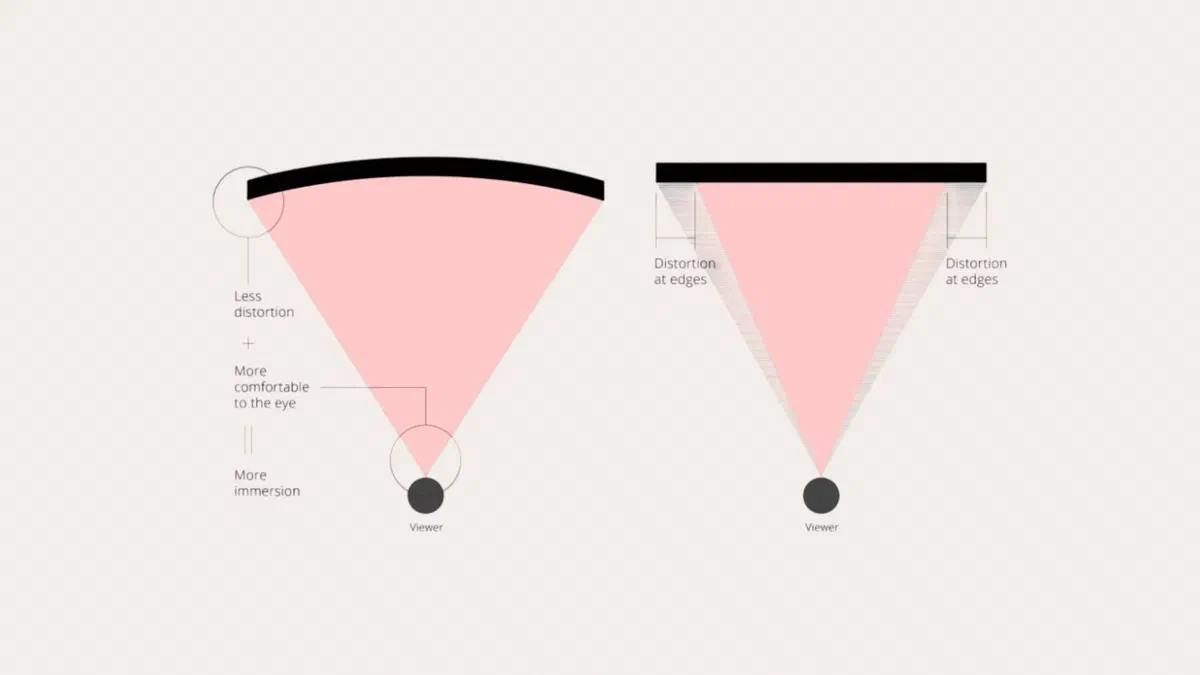
The principle is geometric: on a very wide flat screen, the edges are further from your eyes than the center, so you see them at an angle. By curving the panel, every point returns to roughly the same distance.
However, this only works if you are sitting in the right spot, which is why the same curvature might seem brilliant to one person and useless to another.
Reading the radius of curvature #
Codes like 1800R, 1000R, or 800R indicate the radius, in millimeters, of the circle that the panel is a part of. The lower the number, the more curved the screen. A 3800R, which can be found on some budget models, is almost flat.
A 1000R means the curvature corresponds to a circle with a one-meter radius: sitting one meter from the screen, every point is equidistant from your eyes.
| Radius | Curvature | Ideal distance |
|---|---|---|
| 1800R | Slight | About 1.8 meters |
| 1500R | Medium | About 1.5 meters |
| 1000R | Pronounced | About 1 meter |
| 800R | Very pronounced | Less than a meter |
At a desk, you are usually between 60 and 80 centimeters from the screen: at that distance, tight radii like 1000R or 800R provide the most noticeable advantage. Many recent ultrawide OLED displays use exactly 800R. You barely notice an 1800R on a desk.

When a curved monitor is worth it #
Ultrawide screens. Here, curvature shifts from personal preference to necessity: on a 34-inch flat 21:9 screen, the edges are uncomfortable to look at; when curved, the format feels natural. On 49-inch 32:9 displays, which are equivalent to two 27-inch monitors side-by-side, it is essential.
Large diagonals. From 32 inches up, the difference starts to be felt even in traditional formats.
Gaming and immersive content. The screen fills more of your field of view and the feeling of being inside the scene increases, especially in racing, flight, and first-person games.
Single workstation setup. If you always sit in the same spot, the curvature works for you.
Reflections. The shape deflects light coming from the sides, but it can concentrate light coming from directly in front of or behind you—for example, a window behind you: in a room with many windows, this can become an issue.
When flat is better #
Graphic, photographic, and technical work. Here, the problem is concrete: curvature slightly alters the perception of straight lines. A perfect rectangle might look slightly curved, which is distracting in precise technical drawing, layout design, or photo editing. Those who work with CAD, architecture, illustration, or typesetting prefer flat for practical reasons, not out of habit.
Multiple people in front of the same screen. Outside of the sweet spot, the curvature works against you, and anyone looking from the side will see a distorted image.
Side-by-side monitors. Two curved monitors placed next to each other create an irregular profile, making them frustrating to align. With flat monitors, it’s natural.
Wall or arm mounting. A curved monitor doesn’t sit flush against the wall; it protrudes more and must be oriented precisely: you will need an articulated arm or a VESA mount with spacers.
Limited budget. At the same price point, a flat monitor usually has a better panel: curvature costs money, and that money is taken from other specs.
What to consider before the shape #
- Panel type. IPS for faithful colors and wide viewing angles; VA for deep contrast and more convincing blacks; OLED for maximum contrast, with the warning of permanent image retention in case of prolonged static images.
- Resolution relative to diagonal size. A 32-inch Full HD screen shows its pixels; for that diagonal, you need at least 1440p, ideally 4K.
- Refresh rate. 60 Hz is enough for work, but from 120 Hz up, the difference is visible in everything, even just moving the cursor.
- Stand ergonomics. Height and tilt adjustments matter more for your back than any panel specification.
Two monitors or one ultrawide #
This is a choice that often comes along with the previous one.
A 21:9 curved ultrawide has about a third more horizontal space than a 16:9 of the same height, without bezels in the middle: it’s convenient for video editing timelines, wide spreadsheets, and side-by-side windows. It uses only one arm and one cable.
Two separate monitors cost less for the same surface area, you can orient them however you like (one even vertically, which is great for reading documents and code), and if one breaks, you still have the other. However, there is a bezel in the middle.

There is no single right answer for everyone: it depends on whether you more often work with one very wide window or two separate windows.
And if you can’t decide, there are also foldable monitors, such as the Corsair Xeneon Flex or some LG UltraGear models, which switch from flat to curved with a lever or a button. They are quite expensive, but they solve the dilemma between work and gaming.
FAQ #
Does a curved monitor cause less eye strain? #
The idea is that, with the center and edges at roughly the same distance, your eyes have to refocus less; on large screens viewed from close up, a small benefit is plausible. However, there is no solid evidence of an advantage for everyone: things like appropriate room brightness, breaks, and correct viewing distance matter much more for eye fatigue.
Is a curved monitor okay for graphic design and photography? #
For occasional use, there are no problems. However, for professional work where geometry is crucial (layout, technical drawing, illustration, architecture), a flat monitor is better because the curvature distorts your perception of straight lines, forcing you to correct them mentally.
Can I use a curved monitor for console gaming? #
Yes, but with one caveat: consoles output images in 16:9, so on an ultrawide, you’ll end up with two black bars on the sides or a stretched image. If you mostly play on consoles, a traditional aspect ratio curved monitor makes more sense than an ultrawide.
Does the curvature become noticeable after a while, or does it remain annoying? #
Usually, you get used to it within a few days and forget it’s even there. On the other hand, those who work with straight lines every day will continue to notice it, and they are exactly the people who should choose a flat monitor.
Do glasses wearers have problems with curved monitors? #
Generally, no: with the right curvature for your viewing distance, the center and edges remain more or less at the same distance from your eyes. However, with progressive lenses, the height of the monitor also matters significantly; if you have vision impairments, it is a good idea to try one before buying or consult your optician.
Is it better to have one large curved monitor or two smaller flat ones? #
If you often work with a single very wide window, go for the large curved one. If you always keep two programs side-by-side, two separate screens are more practical: each window has its own monitor and you don’t have to manually split the space. On an ultrawide, however, Windows Snap or PowerToys FancyZones can divide the screen into zones with a single click.