Best Free WYSIWYG HTML Editors for the Web
Compare CKEditor, TinyMCE, Quill, and more: explore features, licenses, and learn how to choose the right rich text editor for your site or app.
On this page
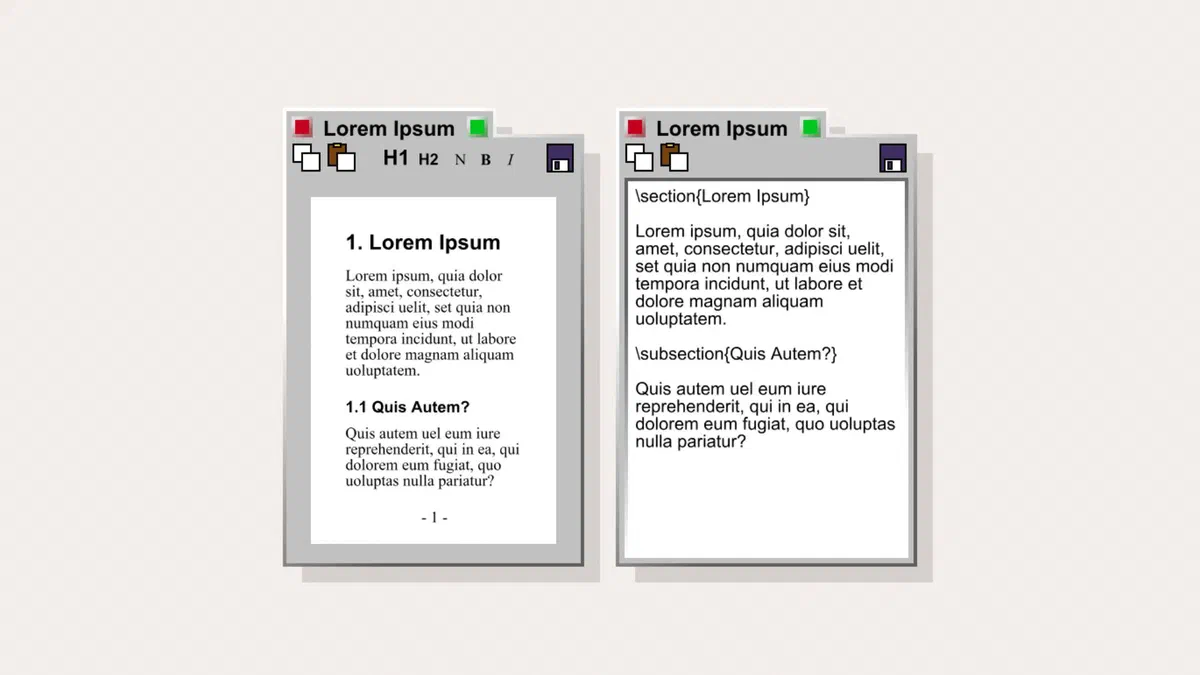
The acronym stands for “what you see is what you get”: whoever is writing sees the text already formatted instead of tags, and can usually switch to a source code view to make tweaks. You’ll find them in admin panels, CMSs, and anywhere someone who doesn’t know HTML needs to publish something.
They all look similar on screen; the differences become apparent as your project grows.
How to choose #
- License. This is your first filter. Some libraries have moved from permissive licenses to copyleft or commercial licenses: in a closed-source product, they can impose obligations you didn’t anticipate.
- Weight. A full-featured editor can exceed a few hundred kilobytes. On an internal dashboard, this doesn’t matter; on a public page, it does.
- HTML Cleanliness. The real test is when someone pastes text from Word: serious editors strip out unnecessary formatting, while others let it pass through, filling your database with inline styles.
- Extensibility. Image uploads, mentions, tables, templates: check if the feature you need is included or if it’s a paid module.
- Accessibility and mobile. These can only be tested in the field: some editors become unusable on small screens.
Main options #
| Editor | License | Main Strength |
|---|---|---|
| CKEditor 5 | GPL 2+ or commercial | The most complete, very polished |
| TinyMCE | GPL 2+ or commercial | Widespread use and great documentation |
| Froala | Commercial | Very polished interface, fast |
| Quill | BSD | Lightweight, excellent for modern apps |
| Tiptap | MIT (paid Pro modules) | Based on ProseMirror, very flexible |
| Lexical | MIT | Developed by Meta, designed for React |
| Editor.js | Apache 2.0 | Produces blocks in JSON, not HTML |
| Jodit | MIT (paid Pro version) | No external dependencies |
| Trix | MIT | Simple, integrated with Ruby on Rails |
| Summernote | MIT | Straightforward, based on Bootstrap |
CKEditor 5 #
It is the most mature in the group, having been around for over twenty years: real-time collaborative editing, advanced image management, full tables, formulas, accessibility controls, and a Word paste feature that actually works. With its plugin architecture, you only include what you need.
The licensing is dual: GPL 2 or later for compatible open-source projects, or a commercial license that removes copyleft restrictions and unlocks premium features like collaboration, export to Word and PDF, and an AI-based assistant.
If your product is closed-source, you will need the commercial license. As of version 44 at the end of 2024, even using it under GPL requires specifying a license key ('GPL') in the configuration.

TinyMCE #
For years it was the gold standard (it was the engine behind WordPress’s Classic Editor), and it still has the most documentation and ready-to-use integrations. One thing to note: with version 7 in 2024, it moved from the MIT license to GPL 2 or later. If you used it in a proprietary product based on the old terms, check your situation and, if necessary, switch to a commercial license.
Here too, the features most requested by companies are paid, starting with PowerPaste, which cleans text pasted from Word and Excel. It remains a solid choice, provided you check the license before you start building.

Froala #
It has been commercial from the start, without a free version for production use, but it likely has the most pleasant interface in the group: an adaptive toolbar, contextual popups, elegant tables, and extremely fast startup. If you have the budget and user experience matters, it’s worth a trial.

Quill #
Lightweight, with a clean architecture and its own document model (Delta) instead of simple HTML. After a long hiatus, version 2.0 was released in 2024; it is widely used in modern applications where a predictable editor that is easy to control via code is required.
It lacks the richness of CKEditor regarding tables and complex content, but for comments, descriptions, and medium-length text, it’s more than enough.
Tiptap and Lexical #
These are the two new names that many developers choose today. Tiptap relies on ProseMirror, has excellent integration with React, Vue, and other frameworks, and lets you build whatever interface you want; collaboration and certain modules are paid. Lexical is the editor developed by Meta—lightweight and designed primarily for React. Both require more initial work than a “turnkey” editor because you have to build the toolbar yourself.
Editor.js #
It works differently from the others: instead of producing HTML, it returns a block structure in JSON format. Every paragraph, image, or quote is a block with its own data.
This is an advantage when content needs to be reused in different places, such as websites, apps, and newsletters, because you decide how to present it when displaying the data. It’s a disadvantage if you only need HTML to save and display.
Jodit, Trix and Summernote #
Jodit is written in TypeScript without dependencies and offers a good balance between weight and features, including a small editor for cropping and resizing images. It is MIT licensed, with a paid Pro version available for the advanced file manager and other features.

Trix was born in the Ruby on Rails world; it is intentionally minimal and produces very clean markup.
Summernote relies on jQuery and Bootstrap and can be configured in just a few lines; Air mode hides the toolbar and shows buttons only when you select text. It is the quick choice for an internal dashboard, even if updates are slower than those of CKEditor or TinyMCE.

Three things you find out too late #
Incoming HTML must be filtered on the server. No editor replaces this step: anyone can send hand-written content to your site by bypassing the interface. You need a server-side sanitization library (for example, HTML Purifier in PHP or DOMPurify with Node), otherwise you allow someone to execute code in the browser of other visitors.
Image uploading is usually not included. The editor gives you the button, but you have to write the part that receives the file (validation, resizing, saving).
Pasting from Word is the ultimate test. Before choosing, paste a real document full of styles into the editor and look at the resulting HTML. It is the test that separates mature libraries from the rest.

How to choose based on the project #
- Open source website or application: CKEditor 5 or TinyMCE in the copyleft license version.
- Closed commercial product: Quill, Tiptap, Lexical, Jodit, or Summernote, which have permissive licenses; or the commercial licenses of CKEditor, TinyMCE, or Froala.
- Internal dashboard to be built quickly: Summernote or Jodit.
- Structured content to be reused elsewhere: Editor.js.
- Real-time collaborative editing is needed: CKEditor with a commercial license, or Tiptap with its paid modules.
- Custom-built React application: Lexical or Tiptap.
FAQ #
Which is the best free WYSIWYG editor? #
For features, CKEditor 5, provided that the copyleft license is compatible with your project. If it’s a closed product and you don’t want to buy a license, Quill is the best compromise between lightness, permissive licensing, and output quality; Tiptap if you are willing to build your own interface.
Are these editors safe against XSS attacks? #
They help, but they aren’t enough. Editors filter content in the browser, and that filter can be bypassed by sending data directly to the server. Cleaning must be done on the server before saving and, even better, before displaying it.
Can I use them with React, Vue, or Angular? #
Yes, the main ones have official components for the most popular frameworks. However, make sure the component is up to date with the version of the framework you are using: that’s where most incompatibilities arise.
Is it better to save HTML or JSON in the database? #
HTML is immediate to display, but it ties the content to a single presentation. Block-based JSON, like that used by Editor.js, requires an extra step for rendering but makes the content reusable across different channels. For a blog, HTML is perfectly fine; for content intended for websites, apps, and newsletters, the structured format pays off.
Does a WYSIWYG editor significantly slow down the page? #
It depends on the configuration. With modular libraries, you only include the plugins you need, which reduces the weight considerably. In any case, load the editor only on the pages where it is needed, not across the entire site.
What is the best WYSIWYG editor for WordPress? #
WordPress uses the Gutenberg block editor, which is not one of these libraries. The old Classic Editor, still available as a plugin, is based on TinyMCE. The libraries in this guide are useful if you are developing your own CMS, dashboard, or application.
Is the produced HTML good for SEO? #
If the editor is good and the writer uses headings as headings rather than enlarged text, then yes. Problems arise with code pasted from Word and <span> full of styles: keep the output clean and, if possible, limit the options in the toolbar that lead to useless markup, such as custom fonts and sizes.