Best Nintendo Switch Emulators: Full Guide
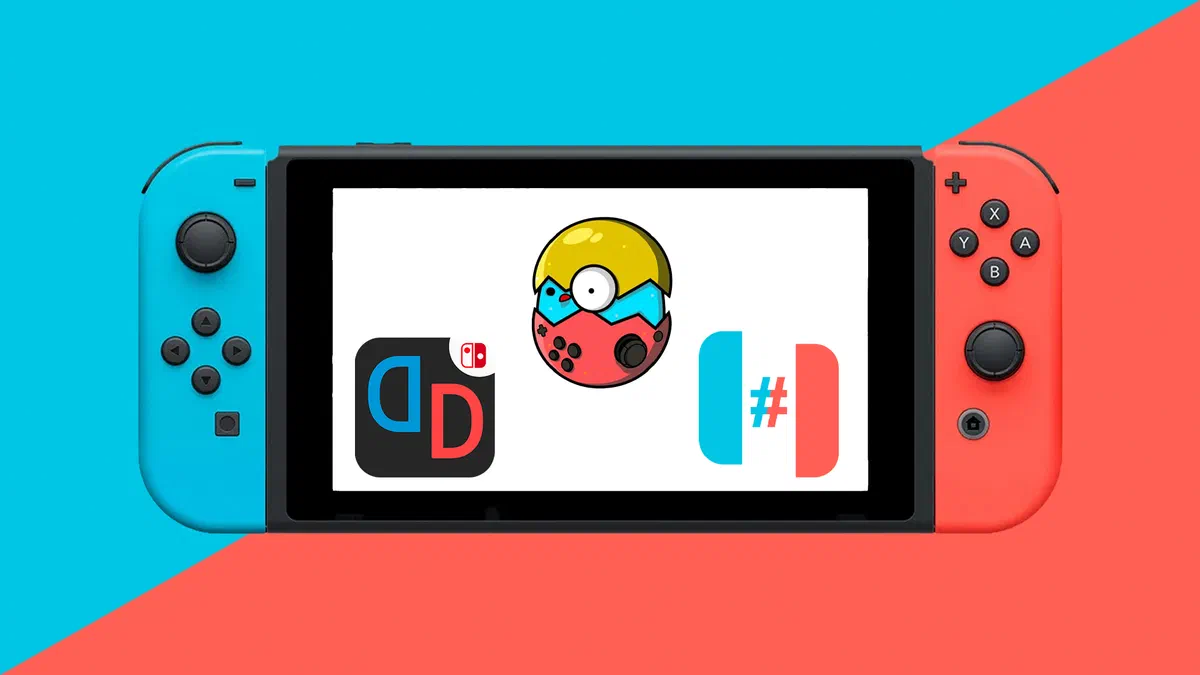
Discover the best Nintendo Switch emulators for PCs and smartphones. Complete guide to installation and configuration of Yuzu, Ryujinx and Egg NS.
On this page
In the modern gaming scene, interest in the best emulators for Nintendo Switch is constantly expanding. Video game enthusiasts deeply appreciate the versatility of the Nintendo home hybrid console, a device that combines traditional gaming experience with the portability of a compact and modern hardware.
However, a strong need arises when you want to play your favorite titles on different peripherals, such as powerful desktop computers or latest smartphones. In these scenarios, emulation software becomes essential. But what are the real chances of achieving smooth and stable performance?
For users who want to maximize the graphics of their games by using PC hardware, the open source software market offers different solutions that match the title of best emulator for Nintendo Switch. Thanks to these applications, you can enjoy high resolution legitimate backup copies of iconic titles. Today, with the right configurations, videoludic masterpieces turn smoothly even outside their native ecosystem.
It is important to emphasize, however, that emulation is often associated with technical obstacles such as annoying framerate (stuttering), audio synchronization and rescue file corruption. Unfortunately, the titles that guarantee impeccable emulation sometimes go unnoticed, obscured by the problems of optimization of the most complex games, making the choice of the software a real challenge for the neophytes.
Another obstacle is the dispersion of information online. When looking for a configuration guide for emulation, the amount of data can disorient who is at first arms. Each software has architectures, advantages and precise limits, as well as variable system requirements: some are optimized for mid-range machines, while others require point hardware components to deliver excellent graphics performance.
Yuzu #

Born initially to support the development of homebrew applications, Yuzu has progressively extended its potential, becoming one of the reference points for emulation of commercial titles for Nintendo Switch.
Originally developed by the same team responsible for Citra (known emulator for Nintendo 3DS), Yuzu was released free of charge as an open source project. Written entirely in language C++, this application is designed to accurately replicate the hardware components of the console. Although the software is highly advanced, complex architectures of some titles can still generate graphical imperfections or bottlenecks in performance.
Despite the enormous computational load required by the emulation, Yuzu has proven to be able to perform point titles with a stable framerate and comparable to the original hardware. The user interface (UI) is clean and intuitive, providing users with total control over graphic settings. The developers also provide an updated database that catalogs the degree of compatibility of individual games, alongside technical documentation for the resolution of error codes.
Main Features: #
- Wide library of fully compatible titles.
- Developed in C++, guarantee of high stability and performance.
- Ability to render the most recent games with minimal lag input.
- Excellent management and balance of consumption of CPU.
- Integration of the Boxcat system to replace the official BCAT network service.
- Upscaling rendering resolution to play in 2K or 4K.
- Full support for OpenGL and Vulkan graphics bookcases.
- Full compatibility with Windows operating systems and Linux distributions.
- Support for local multiplayer (native online connection currently disabled).
- Advanced storage management through multiple user profiles.
- Aesthetic customization with clear, dark and high contrast themes.
Installation and Requirements #
1. Installation of Yuzu software #
- Visit the official website of Yuzu to download the client. Make sure before installing the latest version of Microsoft Visual C+++ Redistributable packages, essential libraries for the correct start of the emulator.
- Launch the downloaded setup file and follow the screen installation wizard.
2. Product Keys and Mod configuration #
- To make the emulator work, you need to import cryptographic keys (prod.keys). You can find legal dump guides from this page.
- To improve graphics optimization, you can download Mod packages from here. and advanced configuration files from here.. This passage prevents crashing into certain demanding titles.
- At the first start of Yuzu, you will see the notice “Derivation Components Missing”. Ignore it by clicking OK to proceed.
- Go to the top menu, click File and select Open Yuzu Folder.
- Create a new directory called “keys” and paste the previously obtained prod.keys file inside.
- Decompress the load.zip archive and move the extracted folder “load” to the main directory of Yuzu.
- Move to Yuzu’s “config” folder, then to “custom.” Extract files from Custom Config.zip package here. Finished the operation, you can hide the zip archive.
- Restart the emulator to apply structural changes.
3. Game library mapping #
- Al centro dell’interfaccia, Yuzu mostrerà l’avviso “Fai doppio clic per aggiungere una nuova cartella alla lista dei giochi”.
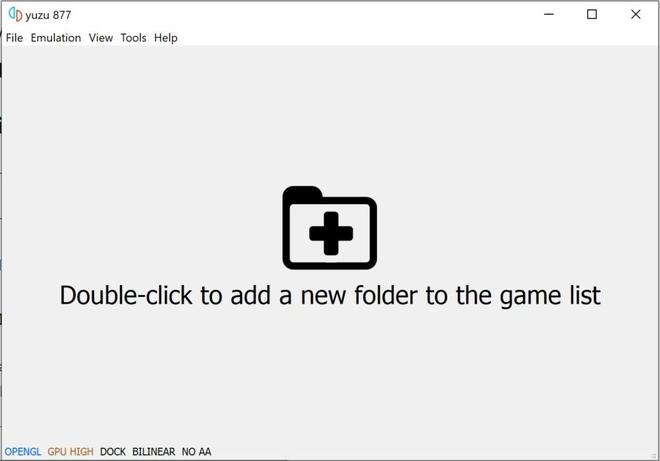
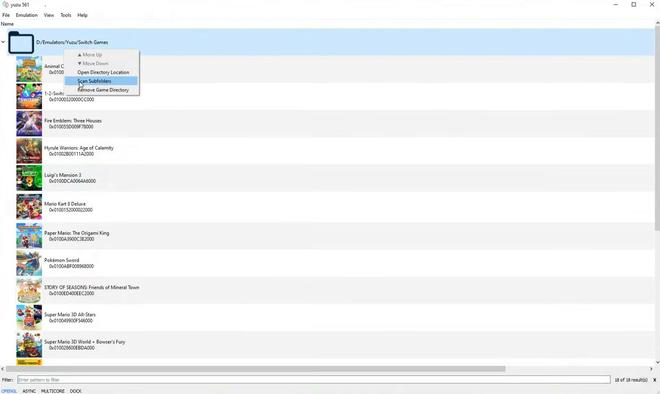
- Double-click and navigate to your PC folder containing legal ROM/Dump files of your Switch games (typically in .XCI or .NSP format).
- Fai clic destro sulla cartella appena aggiunta e seleziona la voce “Analizza le sottocartelle” per aggiornare la libreria visiva.


4. Optimization of CPU and GPU resources #
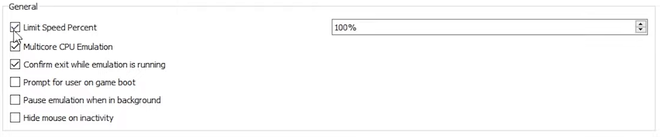
- From the main menu of Yuzu, click on the Emulation tab and access the Configure item.
- Nella sezione Generale, assicurati di spuntare le prime tre opzioni di ottimizzazione.
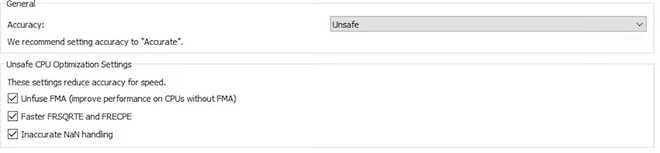
- Spostati nella scheda CPU e modifica il parametro di Accuratezza impostandolo su Non sicuro (Unsafe) per massimizzare gli FPS.
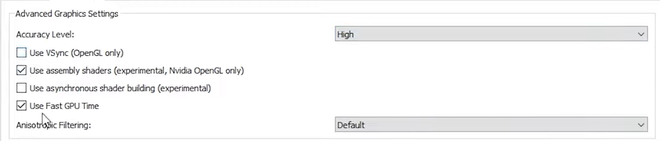
- Nella scheda Grafica: se utilizzi una scheda video Nvidia, seleziona l’API OpenGL. Se il tuo sistema monta una GPU AMD, seleziona l’API Vulkan. Nella sottosezione Avanzate, imposta l’accuratezza grafica su Alta e abilita l’opzione “Usa gli shader di assembly”.


5. Dedicated optimization for NVIDIA video cards #
- Open the NVIDIA Control Panel (accessible with a right click on the Windows desktop).
- In the side menu, select Manage 3D settings.
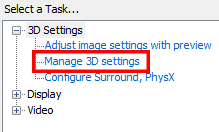
- Move to the Settings tab program, click the Add button and search for the yuzu.exe process.
- Strengthen the activation of the Thread Optimization and modify the Power Management Mode on Prefer maximum performance. This change is crucial to prevent in-game slowdowns.
- Make sure that the GPU rendering OpenGL entry is explicitly assigned to your dedicated Nvidia video card.

Ryujin #

Ryujinx emerges as the first multiplatform emulator for Nintendo Switch to natively integrate support for local wireless connections. Built with solid architecture, it quickly imposed itself as a premium alternative in the field of hardware simulation. Depending on the optimization of the code of the single game, the performance can vary sharply between Yuzu and Ryujinx. Written entirely in C#, Ryujinx boasts an extraordinary native compatibility, embracing the Windows, macOS and Linux ecosystems.
The official documentation of Ryujinx mentions thousands of titles tested, specifying with absolute transparency which are perfectly playable and which still have graphic glitch. The development team works assiduously on the source code to improve the accuracy of rendering, refine the user interface and eliminate the hardware bottlenecks, bringing visual fidelity to surprising levels.
Considered by many advanced users such as the most accurate texture emulator, Ryujinx minimizes graphic corruption. Thanks to community efforts, today you can turn exclusive weight to scaled resolutions and with a granite framerate up to 60 fixed fps on your desktop.
Main Features: #
- Advanced upscaling and total scalability of output resolutions.
- Support native to multiple aspect ratios (including Ultrawide).
- Automated management of anisotropic filter for sharper textures.
- Full integration Discord Rich Presence to show contacts the title running.
- Robust LAN multiplayer module and simulated local wireless support.
- NVDEC decoder emulation for impeccable reproduction of intermezzo and cutcene videos.
- Detailed compatibility Wiki updated by the community.
- Full multiplatform support (Windows, macOS, Linux).
Installation and Requirements #
1. Download and start Ryujinx #
- Navigate to official website of Ryujinx and select the correct package for your operating system (Windows, Linux or macOS).
- The browser will automatically start downloading the last stable build.
- To complete download, unpack the .zip archive. On Windows environments, right click on the compressed file and select the item Extract everything….
- Posizionati nella cartella di destinazione scelta e fai doppio clic sull’eseguibile nominato Ryujinx per lanciare la console virtuale.
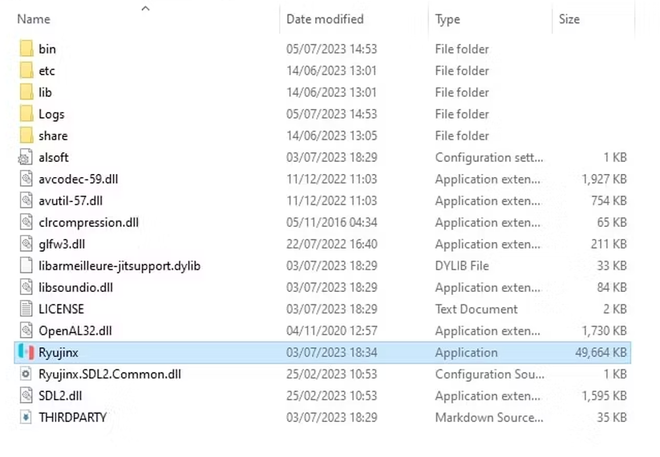
- This way you will have access to the basic interface. However, to enable the execution of the games, it is mandatory to complete the configuration of the firmware and system keys.

2. Configuration of Ryujinx System #
- As with Yuzu, the essential condition for running Ryujinx is the insertion of the prod file. I’m sorry.
- From the Ryujinx menu bar, select File, then click Open Ryujinx Folder and navigate the System folder.
- Check the presence of the prod file. I’m sorry.
- If the folder is empty, you will legally export the keys from your console or retrieve them via portals like Prod Keys, then paste them into this directory.
- Afterwards, you will need to get system firmware files, such as this page.
- Return to Ryujinx, click the Tools menu (Tools) and select the Install firmware item.
- If you own the compressed firmware archive (in .XCI or .ZIP format), select Install to firmware from XCI or ZIP and point to the file.
- If you have extracted the firmware files in a folder, select Install to firmware from a directory and indicate the exact location.
Egg NS (Mobile emulator) #

The emulation has crossed the boundaries of Desktop PCs, landing on mobile devices thanks to Egg NS Emulator. Developed in the United States by the NXTeam Studios team, this ambitious smartphone application allows you to run the Switch titles directly on your phone, offering touch control mapping and physical gamepad support. Future updates promise to further increase the compatibility rate and thermal stability on mobile devices.
Configure Egg NS requires a slightly higher learning curve. The correct initialization of the software requires the presence of the “Switchdroid” folder and the legally dumped ROMs from your physical console. These procedures require a discreet technical expertise in using extraction software, which could initially discourage the occasional user.
After the obstacle of the configuration, the emulator pays off with exceptional graphics on high-end devices. Given the complex architecture of the original games, the phone hardware plays a crucial role. To prevent overheating and annoying slowdowns (lag), it is essential to use devices equipped with high-level System-on-a-Chip, such as the renowned Qualcomm Snapdragon processors (series 855, 865 or higher).
Despite the compatible title library not yet as large as that of its “big brothers” on PC, Egg NS Emulator is rapidly evolving. The continuous release of updates from programmers suggest that, in the near future, this software could monopolize the emulation landscape on Android.
Main Features: #
- Increased compatibility with the most successful titles.
- Advanced deployment of ARM architectures for excellent mobile performance.
- Native integration for external controllers to simulate the console feeling.
- Reactive and extremely precise touch controls input.
- User interface (UI) mobile-friendly and essential.
- Sorted classification for genres and compatibility.
- Multilanguage localization to reach a global audience.
- Fluid and invasive advertising banner-free software experience.
Installation #
The official download of the application for Android is available securely directly on the Google Play Store via this direct link.
Is it legally allowed to use emulators? #
The installation and use of emulator software are absolutely and uncontrollably legal practices in Italy and the world. The heart of the legal question lies in the acquisition of gaming software. Unauthorized download of copyrighted ROMs (via pirate portals) is considered a violation of copyright laws. However, making personal backups (dump) of regularly purchased game cartridges falls within the margins of the “fair use”. Ultimately, the open source structure of emulators does not break any patents: it is the responsibility of the end user to ensure a lawful and respectful use of intellectual property.
Where can you find the game files? #
The most ethical and safe method from the legal point of view to obtain .XCI files or . NSP to power your emulator is to extract them (dumping) directly from the memory of your console or from the physical cards in your possession, using dedicated tools and open source scripts available on authoritative portals dedicated to development, such as GitHub. It is strongly advised not to use torrent circuits or unchecked third-party sites to download illegal archives, as they expose the system to serious cyber risks and violate anti-piracy regulations (DMCA).
FAQ - Frequently Asked Questions #
What are the minimum requirements to smoothly emulate the Nintendo Switch on PC?
To start emulators like Yuzu or Ryujinx, the PC needs a 64-bit operating system, a modern quad-core processor (such as an Intel Core i5 or AMD Ryzen 3), at least 8GB of RAM memory and a dedicated video card that supports Vulkan 1.1 or OpenGL 4.6 APIs (equivalent to a GT 1030 or higher Nvidia).
Are Nintendo Switch emulators safe to download and install?
Yes, if downloaded from their official sites or official repositories on GitHub. Open source applications such as Ryujinx are secure and constantly controlled by the community of developers. Always avoid downloading from third-party aggregators websites to prevent the risk of malware or viruses.
Can you play online multiplayer on official servers using emulators?
No, access to the official servers of the Nintendo Switch Online is blocked and precluded to emulators. However, most software (such as Ryujinx) bypasses this limit by simulating wireless LAN connections, allowing users to play in multiplayer via private networks or unofficial servers managed by player communities.