

When it comes to managing disk space, efficiency in identifying which folders and files occupy most space can be crucial. In this context, TreeSize Free emerges as a well-known tool for Windows users.
Advantages and Disadvantages of TreeSize Free
To fully understand the usefulness of TreeSize Free, it is essential to objectively analyze its strengths and limitations.
| Benefits | Disadvantage |
|---|---|
| Supports different sorting options. | Exclusively compatible with Windows. |
| Ability to locate large files on internal and external hard drives. | The filter function could be improved. |
| Flexibility in setting measurement units (GB, MB, KB). | Program updates may be less frequent. |
| Availability of a portable version for installation without configuration need. | Some advanced features are reserved for paid users. |
Key Features of TreeSize Free
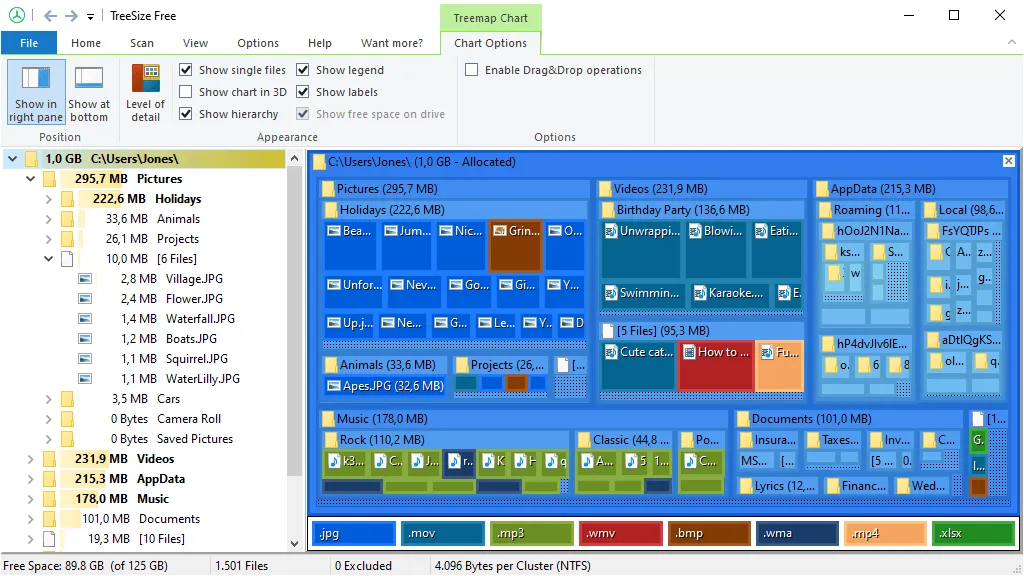
TreeSize Free is compatible with Windows 11, Windows 10 and Windows 8.1, and offers an intuitive interface similar to File Explorer. Displays the results both in a tree structure and in a TreeMap version, thus offering a detailed perspective of the size of folders and files. You can sort the folders by size, percentage of occupied space, date of last modification and total number of content items.
Users can customize the look of the interface and change the measuring unit according to their preferences. A filter option is available to exclude or include results based on certain criteria, such as including only ISO file extension. You can also print the results or convert them to PDF for future references.
Final considerations
In conclusion, TreeSize Free is a valuable tool for Windows users who want to analyze and optimize disk space. While presenting some limitations, such as exclusive availability on Windows and the absence of frequent updates, its ability to provide a detailed analysis of the size of folders and files makes it a useful resource for managing storage on Windows devices.
Link to download TreeSize Free


